Affiliate programs
There are two ways to earn free credits on KaraokeClip — you can use one, the other, or both:
- The Creator Program — publish subtitled videos made with KaraokeClip, link back to us, and receive free credits, renewable without limit.
- Referral — every account can earn credits when the people it refers buy credits.
The Creator Program
The idea is simple and honest: you give the platform visibility, we give you credits. Every video you publish with our tools — with a link back to karaokeclip.video in its description — earns you a new batch of free credits. No subscription, no contract, no imposed quota: you publish at your own pace, and each publication opens the door to a renewal.
Who it's for
Any creator with an active channel on a public video platform — YouTube, Odysee, Rumble, Vimeo, Dailymotion, or any other — from the independent amateur to the seasoned professional. And it's not only for karaoke: the generator is a professional-grade synchronized-subtitling tool, just as useful for:
- music clips and covers, podcasts and interviews,
- tutorials and courses, documentaries and reports,
- short films, gaming, reactions and vlogs,
- corporate videos, and short-form content for social media (Reels, Shorts, TikToks).
What you receive
Credits have a real, transparent value (1 credit = €1), and Creator-Program credits are spent exactly like bought ones:
| When | Free credits |
|---|---|
| First validated request | 10 credits — room to explore the tool freely, test, and get your first video just right |
| Each validated renewal | 14 credits — enough for two full videos, with margin for translation and extra previews |
Renewals are unlimited in frequency: every published, compliant, reported video opens the door to another batch. A regular creator can run indefinitely on free credits. (For what each credit pays for, see Credits & pricing.)
What the free credits unlock
Almost the entire generator, with no restriction: MP4 upload up to 1 GB, automatic transcription or your own lyrics file, high-quality audio separation, the transcript-correction screen, word-by-word alignment, the full editor with total subtitle styling, 15 previews included, synchronized translation, email notifications, and HD download.
The discreet affiliate logo
The only difference between bought credits and Creator-Program credits is a logo. On videos generated with free credits, a discreet, semi-transparent KaraokeClip logo is added automatically — reasonable in size, moving slowly along the left, top and bottom edges with long pauses between moves. It's designed to be present without ever getting in the way of your subtitles or your viewers.
Here it is on a real video — the definitive reference for its size, transparency and movement:
This logo replaces the custom-logo / watermark feature, which stays available only with bought credits. If you'd rather generate videos without the logo — for private use, or to add your own branding — simply create a separate standard account and buy credits normally. (More on the imposed watermark on the Logo / Watermark page.)
Inside the editor, affiliate accounts also see a banner reminding them of this:

Eligibility and validation
The guideline is a channel with at least 500 subscribers — enough to make the visibility real and measurable. But it is not a hard rule: every request below that is looked at carefully. If your channel is young yet your content is already polished, regular and genuinely editorial, apply anyway — we visit the channel and judge its potential, not only its numbers.
We may also ask you to prove you own the channel you declare — for example by briefly adding a specific mention on your channel's About page. You can smooth this step by mentioning karaokeclip.video somewhere on your channel now (a pinned comment, your About page…); it can be removed once you're validated. The check is done once and is then definitive.
The three publication conditions
Each video made with free credits must meet three simple conditions:
- Publish it publicly on your channel — and keep it public, permanently (not private, unlisted, or deleted later).
- Keep a link to
karaokeclip.videoin the description, permanently. You present it however you like — a bare link, a recommendation, a mention in your own words. - Email us once it's published to get your renewal, including the video URL, a short piece of feedback (your experience, a suggestion, a bug, an idea), and an explicit request to renew your credits. Once received and verified, your account is recredited within 48–72 business hours.
Even a brief note helps us improve the tool — and creators who take the time for sincere, detailed feedback sometimes get a pleasant surprise on their renewal amount.
Applying
You apply through the partnership form on the main site: your name, email, channel URL, current subscriber count, and a short message. Submitting it means you've read and accepted the program's terms.
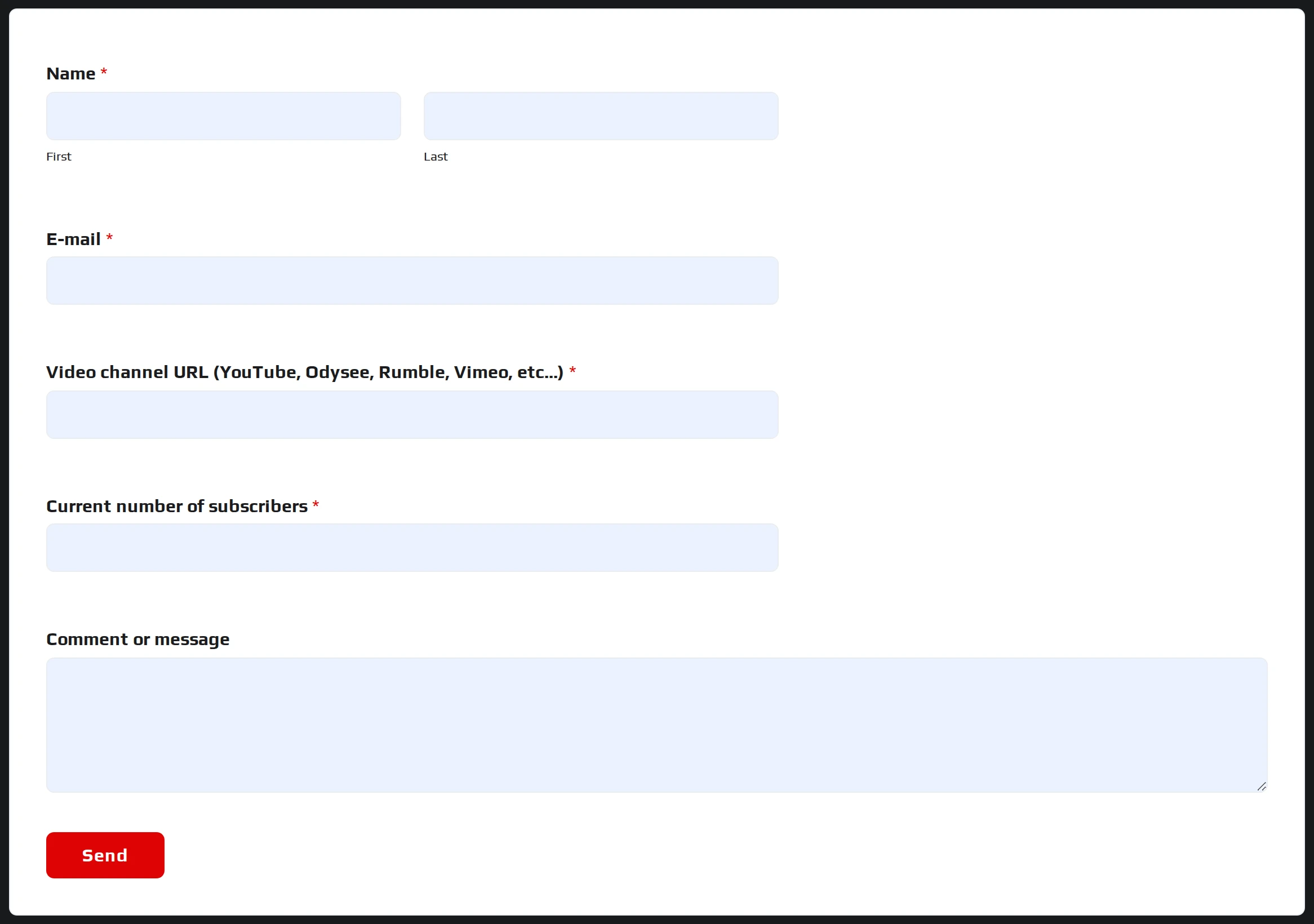
→ Apply here: Affiliate partnership request
Videos and their links must stay public and in place permanently — we keep a verified list of all affiliate videos. Free credits are for public content only; for anything else, use a standard account with bought credits. We may verify channel ownership, and we reserve the right to decline or revoke an affiliation for content that is inappropriate or contrary to our values — regardless of audience size. The full terms are on the partnership page above.
Referral — earn when the people you refer buy
The referral program is built into every customer account. As soon as you've made your first credit purchase — any amount at all — your account automatically includes a referral space with its own dashboard. There's nothing to set up: if you've bought credits at least once, you can already refer others. (It's reserved to customers, so a first purchase is the only entry ticket.)
Sharing your referral link
On the main site, social-share buttons sit beneath the demo videos. When you are signed in, the links these buttons generate carry your referral ID — that's what ties a future sale back to you.

The first buttons are the most common networks; the + button opens the full list — e-mail, Telegram, LinkedIn, Facebook Messenger, a native Share button, and Copy link:

Your referral ID is only added to the links when you're signed in on the main site. If you share while signed out, the buttons produce ordinary share links — fine for sharing, but they won't earn you any affiliate credits.
Your rewards
Rewards are added to your balance as free credits (1 credit = €1), and only a real, paid sale ever earns anything — never a click, a visit, or a sign-up:
| When your referral buys | You receive |
|---|---|
| Their first purchase | 50% of the credits they bought |
| Every purchase after, for life | 15% of the credits they bought |
For example: someone you referred buys 100 credits on their first purchase → you receive 50 free credits. A later purchase of 50 credits → 7.5 (rounded). Your referral is tied to you by email from their first purchase, so you keep earning on their later purchases even if they don't come back through your link.
When you get paid
Credits land automatically 7 days after your referral's purchase:
- Day 0 — your referral buys. The commission is created as Unpaid; no credits yet.
- Days 0–7 — a short holding period. If the sale is refunded or charged back during this window, the commission is cancelled.
- Day 7 — if all went well, the commission turns Paid and the credits are added to your account.
An Unpaid line simply means the 7-day holding period isn't over yet — the credits are on their way. This short wait protects everyone: because we only ever pay on genuine, completed sales, the value of everybody's credits stays sound.
Reading your dashboard
Your dashboard summarizes everything — the last 30 days and all-time — and lists each commission with its status.
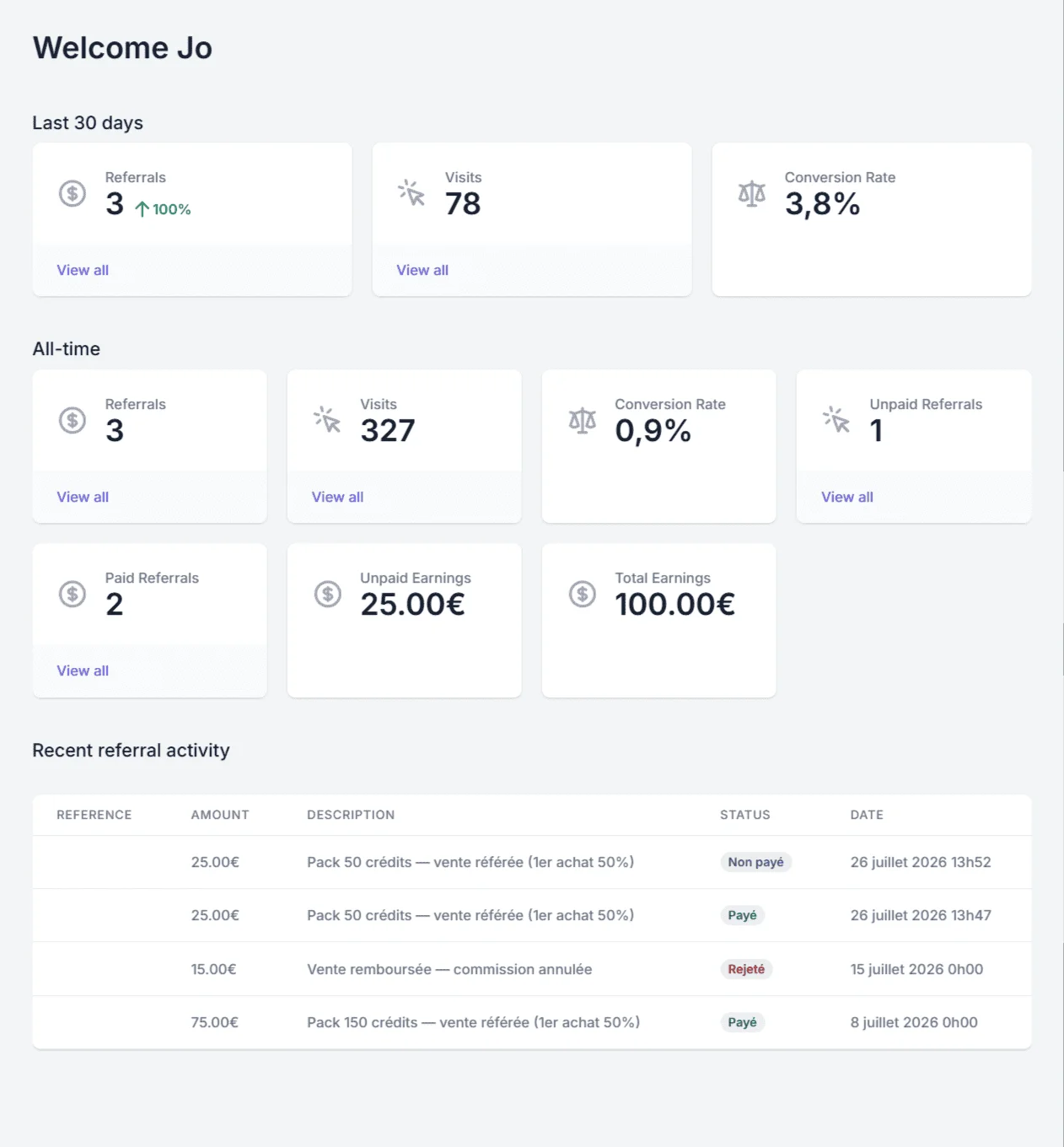
Each line in Recent referral activity carries a status:
- 🟢 Paid — the holding period passed without a hitch; the credits are in your account.
- 🔵 Unpaid — a valid commission still in its 7-day hold; the credits will arrive on day 7. (Not a refusal — just a wait.)
- 🔴 Rejected — the sale was refunded, cancelled or disputed (or the commission was flagged as fraudulent); no credits are paid for that line.
So a line reading "Pack 50 crédits — vente référée (1er achat 50%) — Non payé" will pay out on day 7, while "Vente remboursée — commission annulée — Rejeté" pays nothing.
What the dashboard numbers mean
- Referrals — your number of valid commissions (Paid + Unpaid; Rejected ones are excluded).
- Paid Referrals — commissions already paid out.
- Unpaid Referrals — valid commissions still in their holding period.
- Total Earnings — your total paid earnings (in €, equal to the credits received).
- Unpaid Earnings — valid earnings not yet paid (waiting for day 7).
- Visits — clicks on your referral link that brought a visitor to the site.
- Conversion Rate — converted visits ÷ total visits. It can read 0% at the start, before any visit is tracked — that's normal; it fills in as real visits and sales accumulate.
When a commission is not paid
A commission becomes Rejected (0 credits) when:
- the sale is undone during the 7-day hold — a refund, a cancelled order, a bank chargeback, or a payment that never completes;
- fraud is detected — buying through your own link (self-referral), or the buyer's email matching yours, is rejected automatically; multiple affiliate sign-ups from the same connection are held for manual approval;
- the order has no value — for instance a 100%-off promo code — so no commission is created at all.
This is simply what keeps the program honest: an affiliate can never conjure credits without a genuine paid sale behind them.
New to credits? See how they're spent on the Credits & pricing page, or start creating from Getting started.