What is KaraokeClip?
KaraokeClip turns any MP4 video into a professional karaoke — with lyrics synchronized to the singer's voice, letter by letter — in just a few minutes, and without any editing or technical skills.
KaraokeClip is a karaoke video platform. These pages document its Generator: the online tool that lets you create your own karaoke videos from any video you provide.
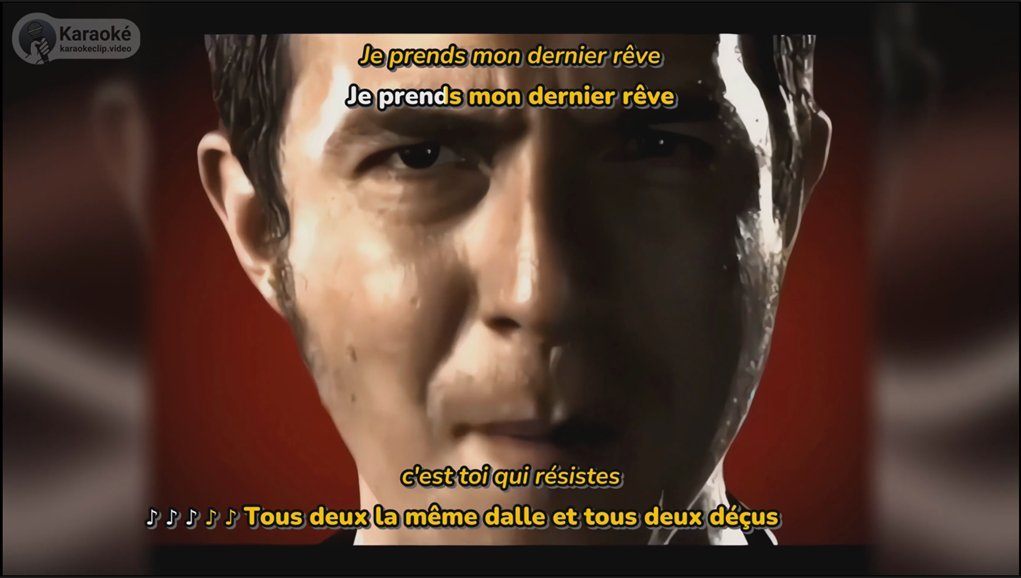
Here is a finished example — a duet, fully synchronized, each line lighting up in time with the voice:
You bring a video, our AI detects and aligns the lyrics to the voice, you fine-tune and style the result, and you export a finished karaoke video — ready to watch, share, or sing along to.
What you can create
KaraokeClip is built for music, but it works on any video that needs precise, synchronized subtitles — optionally translated into another language:
- Music videos — turn a favorite clip into a karaoke to sing at home, with friends, or at a party.
- Family memories — subtitle a wedding, a birthday, or a holiday video.
- Documentaries, interviews, talks — transcribe and subtitle with precision.
- Social media clips — add stylish, synchronized karaoke subtitles for TikTok, Instagram, or YouTube Shorts.
Who it's for
Anyone — from the most tech-savvy to the complete beginner, from 16 to 99 (and beyond): fans who want to sing their favorite songs, party and event hosts, content creators, families, and language learners who want to follow every word.
How it works, in brief
You choose one of two paths for the lyrics:
- You already have the lyrics — provide a
.txtfile and go straight to word-by-word alignment. - You don't have the lyrics — let Whisper transcribe the voice automatically; you review and correct the text (with optional assistance), then alignment runs.
From there, a visual editor lets you fine-tune the timing of every word on a waveform, style the subtitles (colors, fonts, position, karaoke effects), optionally add a synchronized translation in 100+ languages and your own logo, then generate previews and export your final video.
The next section, Getting started, walks you through creating an account, adding credits, and opening the generator.
What makes it unique
- Letter-by-letter synchronization — a real karaoke effect that follows the voice, not a rough line-by-line display.
- Deep customization — one of the most complete sets of subtitle and audio options available for karaoke video.
- Synchronized translation — show the lyrics translated into 100+ languages, in time with the music.
- Available in 33 languages — the whole app is translated, so you can work in your own language.
- Transparent prepaid credits — no subscription. You see the cost of every action in advance, and nothing is ever charged if an operation fails.
Available in your language
Both the app and this documentation are available in the same 33 languages — every screen, button, and message — so you can create your karaoke, and read these guides, comfortably in your own language:
 Arabic
 Catalan
 Chinese
 Croatian
 Czech
Czech Danish
 Dutch
Dutch English
 Filipino
 Finnish
 French
 German
 Greek
Greek Hebrew
 Hindi
Hindi Hungarian
 Indonesian
 Italian
 Japanese
 Korean
 Malay
Malay Norwegian
 Polish
 Portuguese
 Romanian
 Russian
 Slovak
- Spanish
 Swedish
 Thai
Thai Turkish
 Ukrainian
 Vietnamese
New languages are added regularly. And this is only the app's interface language — it is separate from the synchronized-translation feature, which can translate the lyrics themselves into 100+ languages.
Before you start
To use the generator you need a (free) account and some credits. A standard karaoke video starts at 5 credits, and your first 15 preview generations are included, so you can perfect the look before exporting. Full pricing is detailed on the Credits page.
Prefer to have it done for you? Beyond this self-service generator, our team can also create your karaoke videos for you as a made-to-measure service — just get in touch and tell us about your project.